Bering Tonnage Depots & Feeder Routes Explained
Depots turn a port from a pickup point into a hub. Small ports rarely have the right cargo at the right moment for a big ship; a depot lets small ships gather it first.
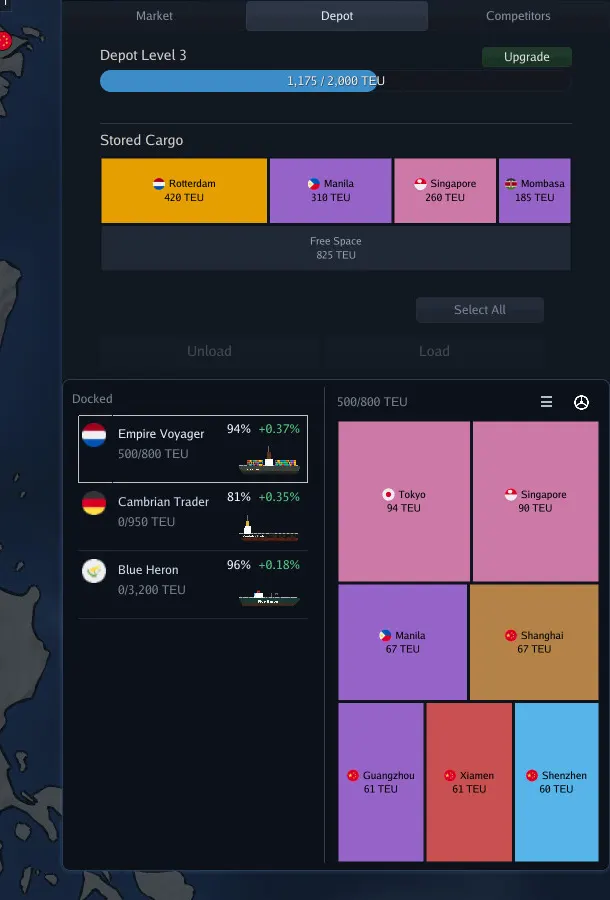
Container yards and depot levels
- Buy one from the port menu: Depot → Purchase container yard. Price in the demo: $50,000.
- First upgrade: $250,000 for 500 TEU of storage.
- Higher levels hold much more: the official Hong Kong screenshot shows Depot Level 3 at 1,175 / 2,000 TEU, with stored cargo split by destination (Rotterdam 420, Manila 310, Singapore 260, Mombasa 185 TEU) and 825 TEU free.
- The depot panel has Unload and Load buttons and Select All, the same as the Market tab.
What a feeder route is
A feeder route collects cargo from several small ports and leaves it at a depot. A separate trunk (collection) route picks it up from the depot and carries it on. The demo tutorial teaches it in two parts.
Part 1: the storage route
- Routes → New route. Add every licensed port in one country (the tutorial used Cuba or the Dominican Republic).
- On each stop, set Load with the destination filter set to country, for the country you are collecting for (the tutorial used Grenada).
- Edit the route so the depot stop Stores all cargo en route to that country. The tutorial’s own words: “This stores all Grenada cargo at the depot. You don’t need to add Grenada to this route.”
Part 2: the collection route
- New route from the depot port to the destination country’s port(s).
- Use Collect at the depot: “Collect all cargo en route to country Grenada”.
- Assign one ship to the storage route and a different ship to the collection route. One ship cannot do both.
The feeder objective that will not complete
Ozkorin hit a demo bug: the objective “Set up a feeder route in Dominican Republic for [country] cargo” kept switching its target country (Grenada, then St. Vincent, Barbados, St. Lucia, Dominica), so a correctly built route never counted. If it happens in the release build:
- Read the current country in the objective text before editing rules, and match it exactly. Objectives use country names, not port names.
- Change the Load and Store filter to that country and wait for the next delivery.
- If the target moves again, report it on the Steam forum; the developer replies there.
Depot tips
- Put depots where your trunk ships already call. A depot off the trunk route just moves the problem.
- Watch fill level. A full yard has no room left for stored cargo; upgrade it or add a second collection ship.
- Feeders fix the export problem: a port’s exports change over time, so a big ship on a fixed line runs half empty. A country-wide Store rule keeps collecting whatever is there.
Did this get your fleet moving?
Thanks. Logged for the next revision.